convolve#
- ndfilters.convolve(array, kernel, axis=None, where=True, mode='mirror')[source]#
Multidimensional convolution of an array with a given kernel.
This function differs from
scipy.ndimage.convolve()andastropy.convolution.convolve()because it implements a vectorized convolution operation where the kernel is allowed to vary along axes orthogonal to the convolution axes.- Parameters:
array (ndarray | Quantity) – The input array to be convolved.
kernel (ndarray | Quantity) – The convolution kernel. Any non-convolution axes must be broadcastable with array. If array and kernel both have units, the units of the result are the product of the two, since the convolution is a sum of products.
axis (None | int | tuple[int, ...]) – The axes of array over which to apply the kernel. If
None, it is assumed that the convolution is applied to all the axes of array.where (bool | ndarray) – An optional mask that can be used to exclude elements of array during the convolution.
mode (Literal['mirror', 'nearest', 'wrap', 'truncate']) – The method used to extend array beyond its boundaries.
- Returns:
A copy of the array convolved with the given kernel, in the product of
the units of array and kernel.
- Return type:
Examples
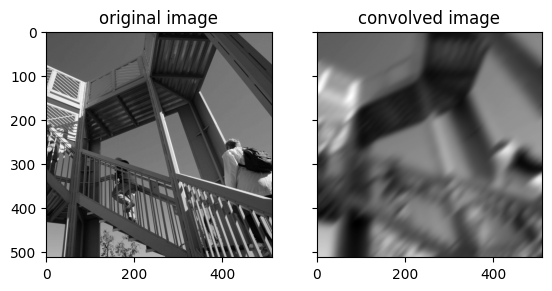
Apply a Gaussian blur to a sample image.
import numpy as np
import matplotlib.pyplot as plt
import scipy
import ndfilters

# Define arbitrary coordinate system
# of the kenrel
x = np.linspace(-1, 1, 51)
y = np.linspace(-1, 1, 51)
x, y = np.meshgrid(x, y)

# Rotate the coordinate system
t = np.pi / 4
u = x * np.cos(t) - y * np.sin(t)
v = x * np.sin(t) + y * np.cos(t)

# Define the standard deviation
# in each dimension of the 2D kernel
sigma_u = 0.5
sigma_v = 0.1

# Compute a 2D Gaussian kernel
kernel_u = np.exp(-np.square(u / sigma_u) / 2)
kernel_v = np.exp(-np.square(v / sigma_v) / 2)
kernel = kernel_u * kernel_v
kernel = kernel / kernel.sum()

# Download a sample image
img = scipy.datasets.ascent()

# Convolve the sample image with the kernel
img_convolved = ndfilters.convolve(
    array=img,
    kernel=kernel,
)

# Plot the results
fig, axs = plt.subplots(ncols=2, sharex=True, sharey=True)
axs[0].set_title("original image");
axs[0].imshow(img, cmap="gray");
axs[1].set_title("convolved image");
axs[1].imshow(img_convolved, cmap="gray");